Airdrops are an effective way to distribute tokens to your users and reward engagement. With Merkl’s reward distribution platform, setting up an airdrop is simple: you just need a properly formatted JSON file containing recipient addresses, reward amounts, the associated reason (e.g., an action to perform), and reward token details.
To make this even easier, we've created a Google Sheet template that will help you generates the JSON file for you.
Follow this guide to set up your airdrop in just a few steps.

Step 1: Prepare your airdrop data
Before creating your airdrop campaign, you need to gather the following information:
- The chain on which you’ll be distributing rewards.
- Token address (the contract address of the token being distributed, so ensure it's on the correct chain and in checksum format).
- Token decimals (usually 18, but some tokens, like USDC, use 6).
- Recipient addresses (wallet addresses that will receive rewards).
- Reward amounts (entered as whole numbers, e.g., 100 OP, not in decimal format).
- Reason for the reward (mandatory - each amount must have an associated reason).
- If a user receives rewards for multiple reasons, add separate rows with different amounts and reasons.
Duplicating the Google sheet
To simplify this process, we’ve created a Google Sheet template that you must duplicate before entering your values.
- Click "File" → "Make a Copy".
- Rename it and save your own copy.
Entering your data in the sheet
Once you have your own copy, replace the template values with your data:
- A2: Token Address of the token you’ll be distributing (ensure it’s in checksum format and correct for the chain).
- B2: Token Decimals (e.g., 18 for OP, 6 for USDC).
- C3 and below: Recipient Addresses (one per row).
- D3 and below: Reward Amounts (corresponding to each recipient).
- E3 and below: Reward Reason (each reward amount must have an associated reason).
- ⚠️ If a user receives rewards for multiple reasons, add separate rows with different amounts and reasons.
🔹 Keep filling rows until all recipients are added.
📌 Merkl applies a 0.5% fee to airdrop campaigns. This fee is added on top of the total airdropped amount, ensuring recipients receive the full intended distribution.
Once completed, download the sheet as a CSV file following this path: Click File → Download → Comma Separated Values (.csv)
Need help or advice before launching your airdrop?
Step 2: Convert the CSV to JSON
To convert your CSV file into the correct Merkl JSON format, use our Google Colab script:
👉 Open the Merkl Airdrop Helper in Google Colab
Running the conversion script
- Click the Play / Run button (▶️) to start the script.

- Scroll down and click "Choose Files" to upload your CSV.

- After uploading, the script will automatically generate and download your JSON file.
Step 3: Upload your JSON to Merkl
- Go to Merkl’s Airdrop Campaign Page.
- Connect your wallet and choose the chain on which you will distribute your airdrop.
- Click on the "No file chosen" icon, then upload your JSON file. Once uploaded, you should see the total amount and recipient details:
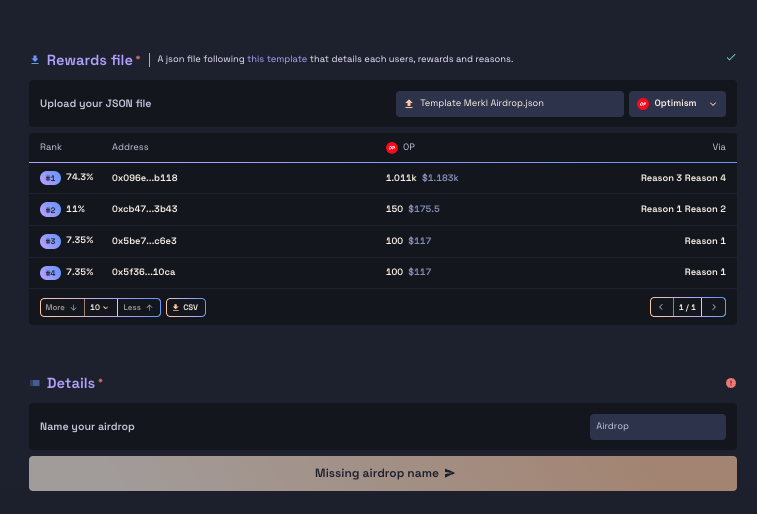 📌 Airdrop Fee Calculation
⚠️ The 0.5% airdrop fee is automatically calculated by Merkl. Ensure your total allocation considers this fee before proceeding.
- Give your airdrop a name.
- Click "Preview Transaction".
- Read and Agree to the Terms & Conditions.
- Click "Approve & Deposit Funds" to finalize the campaign.
Congrats, your airdrop is now live! 🚀
Important note: airdrop fees and distribution timing
Merkl applies a 0.5% fee to airdrop campaigns. This fee is added on top of the total airdropped amount, ensuring recipients receive the full intended distribution.
Adjusting your token amounts
- If you want exactly 100,000 tokens to be distributed, you need to provide 100,502.51 tokens (calculated as 100,000 / (1 - 0.5%)).
- If you prefer to send exactly 100,000 tokens from your wallet, then the total sum of allocations in your JSON file should be 99,500 tokens (calculated as 100,000 * (1 - 0.5%)).
- Our frontend automatically calculates the correct amount for you to avoid misallocation.
Distribution lag
Airdropped tokens become claimable at the next reward update on the target chain, which can take up to 8 hours.
⚠️ If you plan to announce the airdrop, we recommend waiting until rewards are claimable to notify your users.
Related articles

Tech|Feb 13, 2026|3 min read
How to Run Smarter Incentive Campaigns for Earn Products with Merkl
Learn how Merkl helps wallets and exchanges run smarter Earn product reward campaigns, boosting user rewards and maximizing budget efficiency.
Read more →
Tech|Nov 17, 2025|7 min read
What is Merkl? A Simple Guide for Everyone
Discover what Merkl is, whether you're new to DeFi or an advanced user, from finding yield opportunities to launching incentive campaigns.
Read more →
Tech|Jun 20, 2025|6 min read
How to Build a Point Program with Merkl
Learn about the different point programs — tokenized and non-tokenized — you can create with Merkl, and how to launch them.
Read more →